


- Please read carefully to assess and decide which tutoring modality will work best for you.
- While we do help with transfer essays and applications, WE DO NOT HELP WITH PERSONAL WORK OR ASSIGNMENTS FROM OTHER INSTITUTIONS.
- We reserve the right to request a copy of your prompt or syllabus in order to help you understand and meet instructor expectations.
- Maximum of 1-hour per day, and three appointments per week. This is cumulative for both online and on campus appointments.
- Cancel your appointment if you're not able to attend.
- On the rare occasion when a tutor calls out or is ill, we may be forced to reassign or cancel your appointment.
- If you are 15 minutes late, you will be asked to reschedule.
- Multiple "no show" appointments may necessitate a meeting with the coordinator to assess your difficulty attending scheduled sessions.
1. Log into Corsair Connect.
2. From your home page, you can click on the "Tutoring" button under "Make a New Appointment."
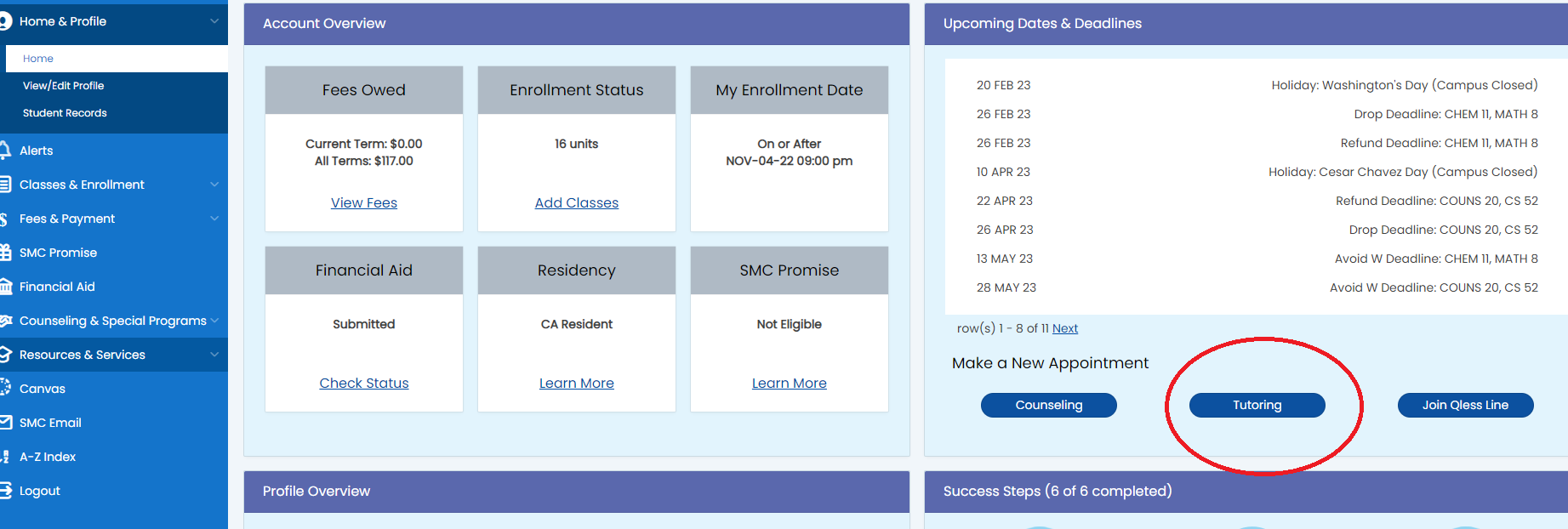
3. If you don’t have an account already, you will be prompted to fill in your personal information and REGISTER. Providing your cell phone number at the bottom of the page will allow you to receive text notifications regarding your appointment (recommended).
4. Choose "Writing & Humanities" from the drop-down menu at the top-center of the page.
5. Select the day, time, modality and tutor you would prefer by clicking on one of the available white boxes. Please note that some tutors help with specific subjects; some have “administrators only” access and are reserved to work with specific classes; some are online; and some are in person. Read carefully to book an appropriate appointment. If you are interested in submitting a paper for the "Written Feedback" option, click on that option and be sure to follow all the instructions carefully and allow up to 48 business hours for a response.
6. When you find a time and tutor you want, click “Reserve” and complete the pop-up box. The default time is half an hour. But you can extend the time to an hour if the tutor is available.
7. Be sure to click “Create Appointment” at the bottom of the window.
8. You will receive a confirmation email confirming the location, date, time and tutor. Please arrive on time.
Thank you for your consideration!